Skip to content

Open source · Self-hosted · All systems go

Mission control for your engineering team.

Free, open-source DORA and PR metrics for your GitHub repos. See which pull request is stuck on the pad, which pipeline is red and how long a fix takes to reach orbit. Run it yourself with one token; your data never leaves your server.

git clone https://github.com/vistik/Houston.git && cd Houston && composer setup

MIT licensed · Laravel + SQLite · launches from your laptop

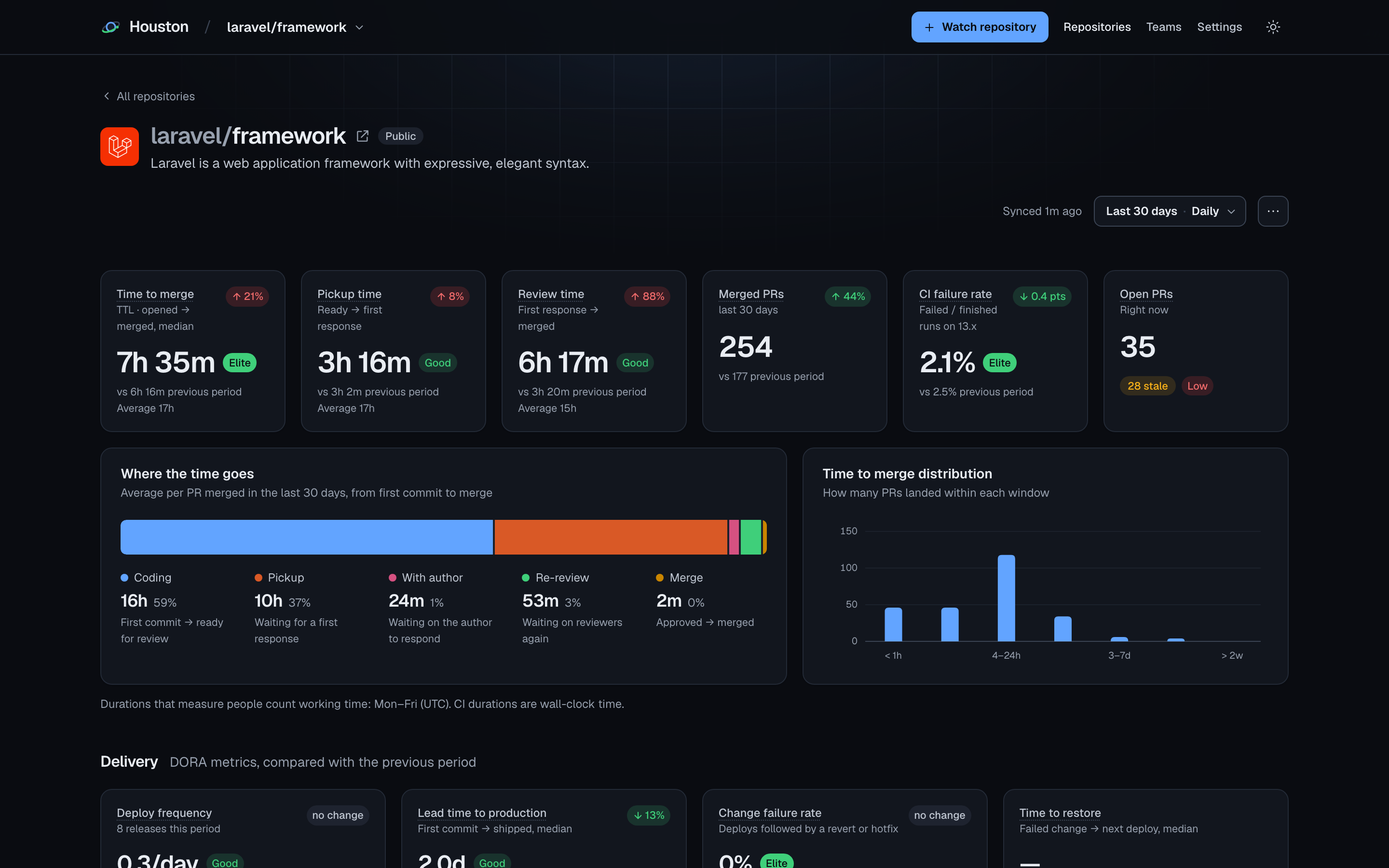
Houston repository report for laravel/framework: time to merge, pickup and review time with ratings, where the time goes, and DORA delivery metrics

Telemetry

43 readouts from the pull requests, reviews and CI runs you already have.

Grouped the way the report reads, from how long a PR waits on the pad to how often production needs an abort. Every metric carries a plain-words note on how it is calculated.

Metrics
43
metrics
Metric groups
5
groups
Built-in benchmark standards
31
benchmark standards
  • Speed

    13 metrics
    • Time to merge
    • Pickup time
    • Review time
    • Time to merge (p90)
    • Lead time
    • Coding time
    • Time to approval
    • Merge delay
    • Waiting on reviewers
    • Waiting on the author
    • Merge frequency
    • Merged PRs
    • PRs opened
  • Review quality

    9 metrics
    • PR size
    • Review rounds
    • Merged without review
    • Changes requested
    • Review depth
    • Rework after review
    • Review concentration
    • Reverts & hotfixes
    • Merge rate
  • CI health

    12 metrics
    • CI failure rate
    • Default branch failure rate
    • PR build failure rate
    • Time the default branch was red
    • CI duration
    • CI duration (p90)
    • Time to recovery
    • Queue time
    • Flaky commits
    • Re-run rate
    • Workflow runs
    • CI minutes
  • Delivery (DORA)

    6 metrics
    • Deploy frequency
    • Lead time to production
    • Change failure rate
    • Time to restore
    • Deployment failure rate
    • Deploys
  • Team & work in progress

    3 metrics
    • Open PRs
    • Stale PRs
    • Active developers

    A PR goes stale after 7 days without activity, and the threshold is a setting. Active developers is a headcount, not a ranking: there are no per-person tables.

Flight recorder · per repository

See where every pull request spends its time.

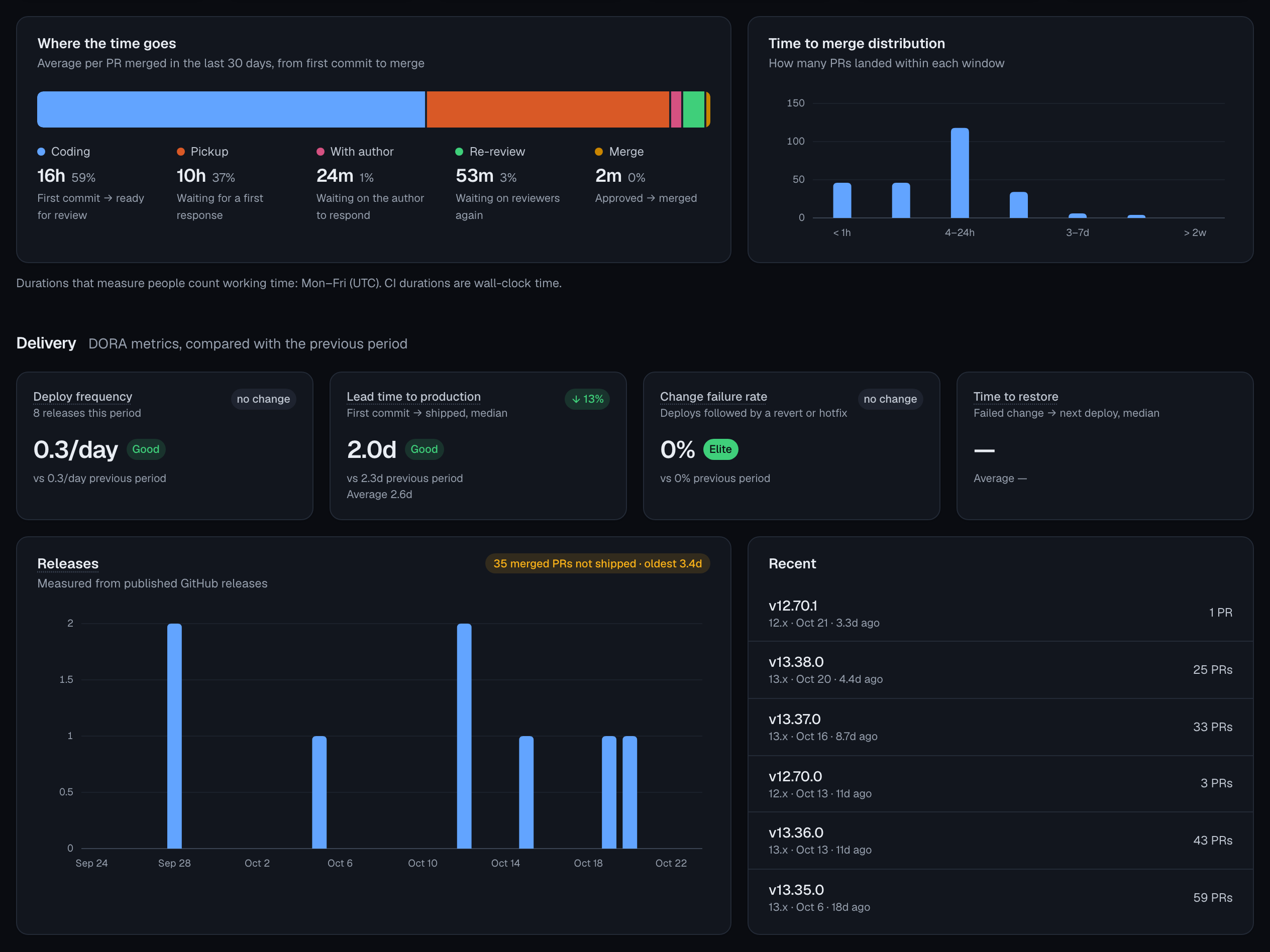
Houston reads a repo's pull requests, reviews, Actions runs and deployments, and splits each PR's flight into coding, pickup, review and merge delay. In working hours, so a PR opened on Friday evening doesn't look two days slower.

  • DORA metrics compared with the previous period
  • Time to merge, pickup and review in working hours, bots excluded
  • The slowest merges listed, so you can open the PR that dragged the tail out

Also on the page: trends, the time-to-merge distribution, CI health and work in progress, for the last 7 days up to 12 months, or a custom range.

Where the time goes for laravel/framework, the time-to-merge distribution, and the four DORA metrics compared with the previous period, and releases with the merged PRs not shipped yet

Mission log · before and after

Log the change. Then see if it helped.

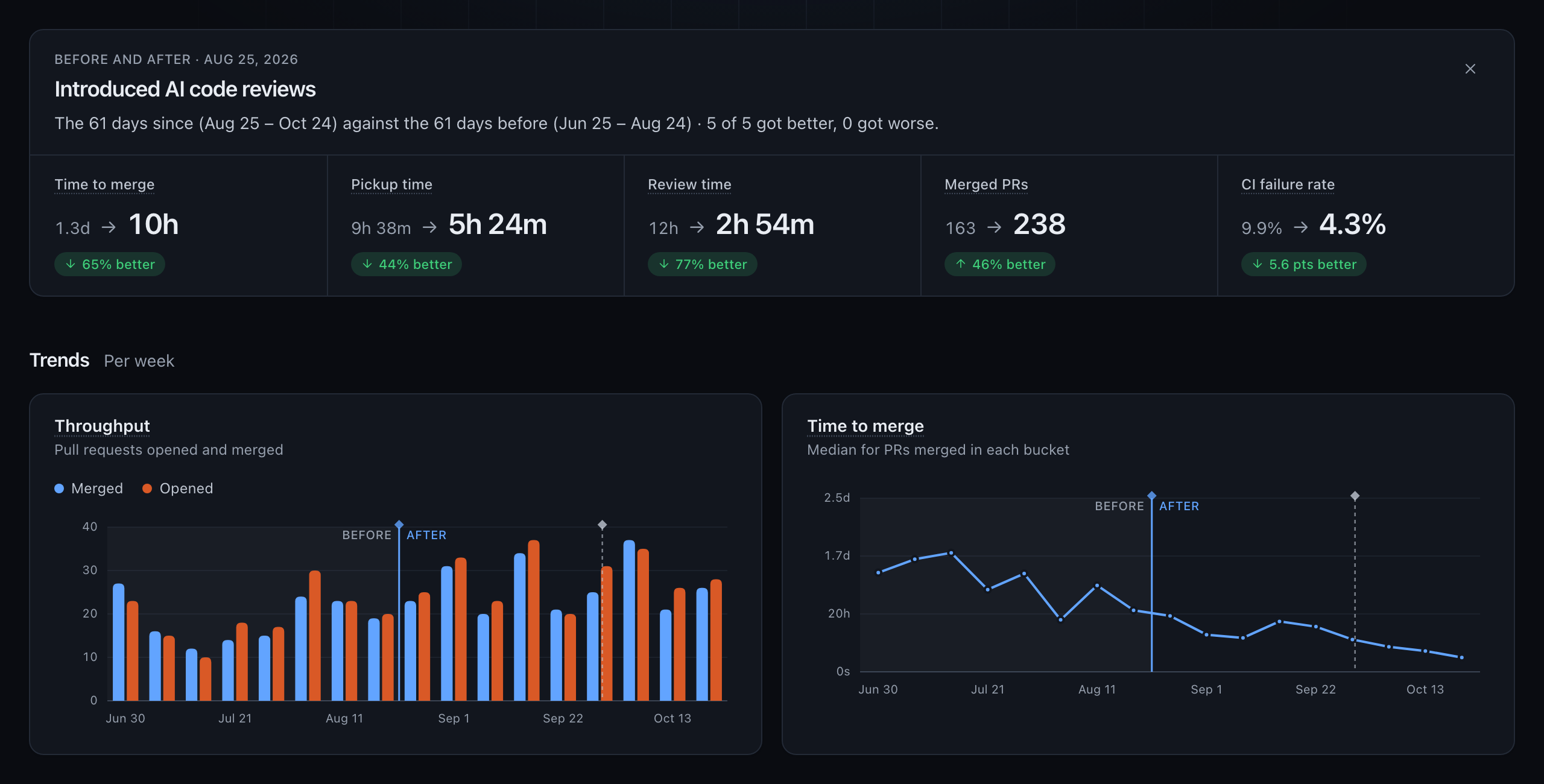
Introduced AI code reviews, switched tools, set up a Slack bot that nudges reviewers: add it as an event and it shows as a line on every timeline. Click the line to compare the time since with the equally long stretch before it.

  • On every trend chart, for every repository and team
  • The days since against the same number of days before, so the comparison is like for like
  • Headline metrics before and after, marked better or worse, with the charts split at the event
Comparing the 61 days since introducing AI code reviews with the 61 days before: time to merge 1.3 days to 10 hours, review time 12 hours to 2 hours 54 minutes, merged pull requests 163 to 238, and throughput and time to merge charts split at the event

Add events under Settings → Events. The screenshot uses the demo data that ships with Houston.

Per team

Report on a team, not a repo.

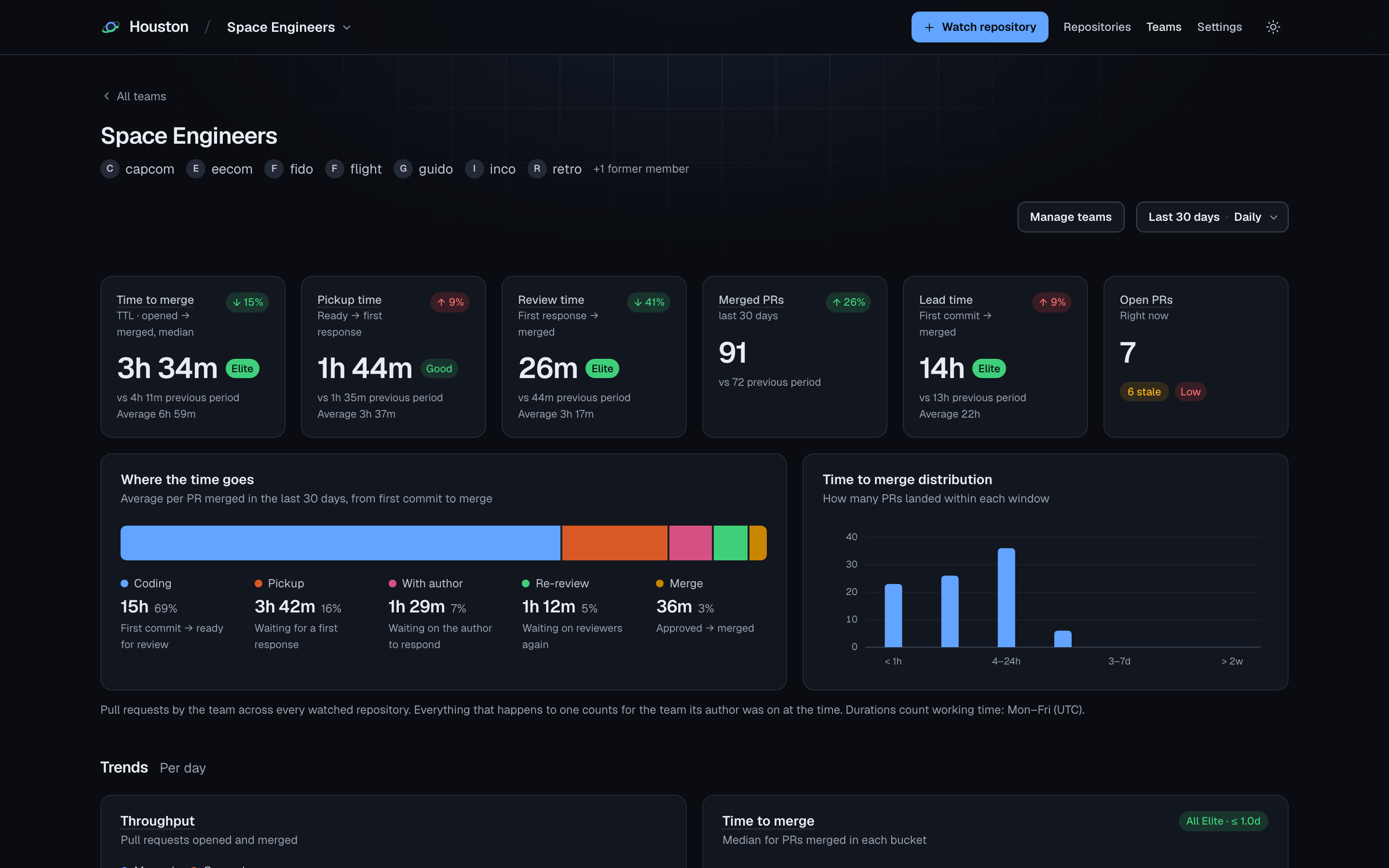
A team is a group of people whose pull requests are reported on together, across every watched repository. Memberships have join and leave dates, so work counts for the team someone was on when they did it.

  • Across every watched repository, not one at a time
  • History follows who was on the team, so a reshuffle doesn't rewrite last quarter
  • The same pull request sections as a repo report: where the time goes, trends, flow and review quality, work in progress, slowest merges

Set teams up under Settings → Teams and add people by their GitHub login.

The Space Engineers team report in Houston: time to merge, pickup and review time with ratings, and where the time goes, across every repository the team works in

How memberships count

B left halfway through, C joined later. Each person's PRs count for the team only while they were on it.

CAPCOM · MCP

Give your AI assistant a line to mission control.

Houston ships a read-only MCP server. Connect Claude Code or any MCP client and it becomes your CAPCOM: ask about cycle time, review load or a bad week in CI. The assistant reads the same reports you do, including the previous period to compare against.

  • 3 read-only tools and a prompt that walks through a full review
  • Locally over stdio with php artisan mcp:start houston
  • Over HTTP at /mcp with a bearer token; the endpoint stays off until you set one

Register the local server with Claude Code. Use the absolute path to your checkout.

claude mcp add houston -- php /path/to/Houston/artisan mcp:start houston

stdio · read-only · no token needed locally

An example exchange Example output · values are placeholders
  1. You: Houston, how did review time on laravel/framework change over the last 30 days?
  2. ● calls get-velocity-report read-only

    { "repository": "laravel/framework", "days": 30 }
  3. Assistant: Median review time was [x h] over the last 30 days, against [y h] in the 30 days before, counted in working hours. Pickup time moved from [a h] to [b h]. The slowest merge, #[number], waited [n days] for its first review. Want me to list the PRs that waited longest?

What the server offers

list-repositories tool
Every watched repository with headline velocity KPIs, a daily merge trend and default branch CI status.
get-velocity-report tool
The full report for one repository: every KPI with its previous-period value, the cycle time breakdown, CI workflows, slowest merges and DORA delivery metrics.
list-pull-requests tool
Cached pull requests with lifecycle timestamps, size, discussion counts, labels and reviews, to drill into the examples behind a metric.
give-feedback prompt
Review a repository's engineering velocity and give the team concrete, evidence-backed feedback.

The big board

Put it on the big board.

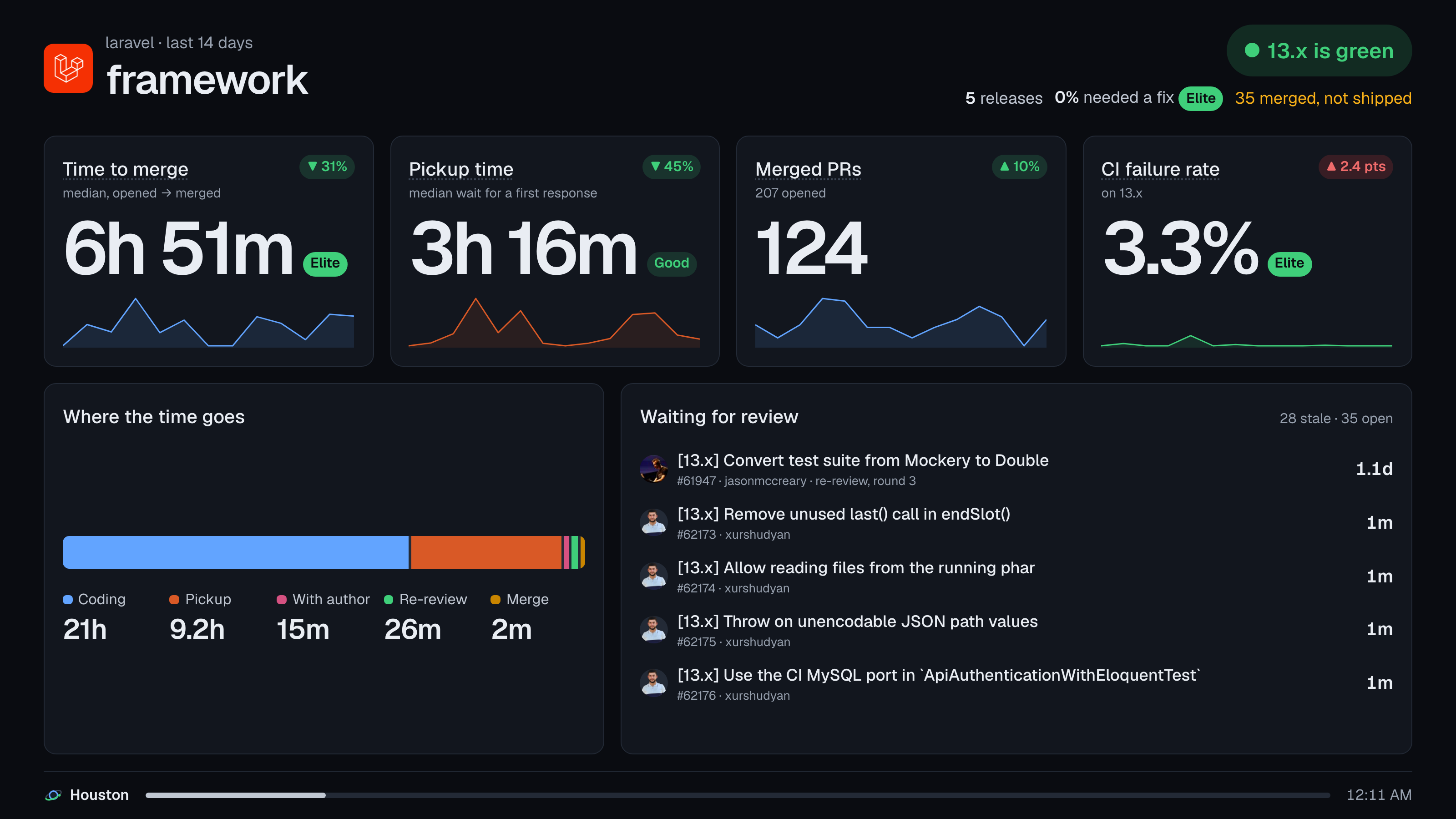
A hands-off, auto-rotating view meant for a screen on the wall, like the front screens in mission control. It is always dark, whatever theme the app uses, and shows one repository at a time.

The Houston wall display for laravel/framework over the last 14 days: time to merge, pickup time, merged PRs and CI failure rate with their trends and benchmark ratings, where the time goes and the PRs waiting for review
Rotates every 20 s
Anywhere from 5 to 600 s with ?rotate=
Step through it
← → previous and next
Pause
Space holds the current slide
All repos or one
/wall for every repo, /repos/{owner}/{name}/wall for one

Go / no-go

Set your own go / no-go criteria.

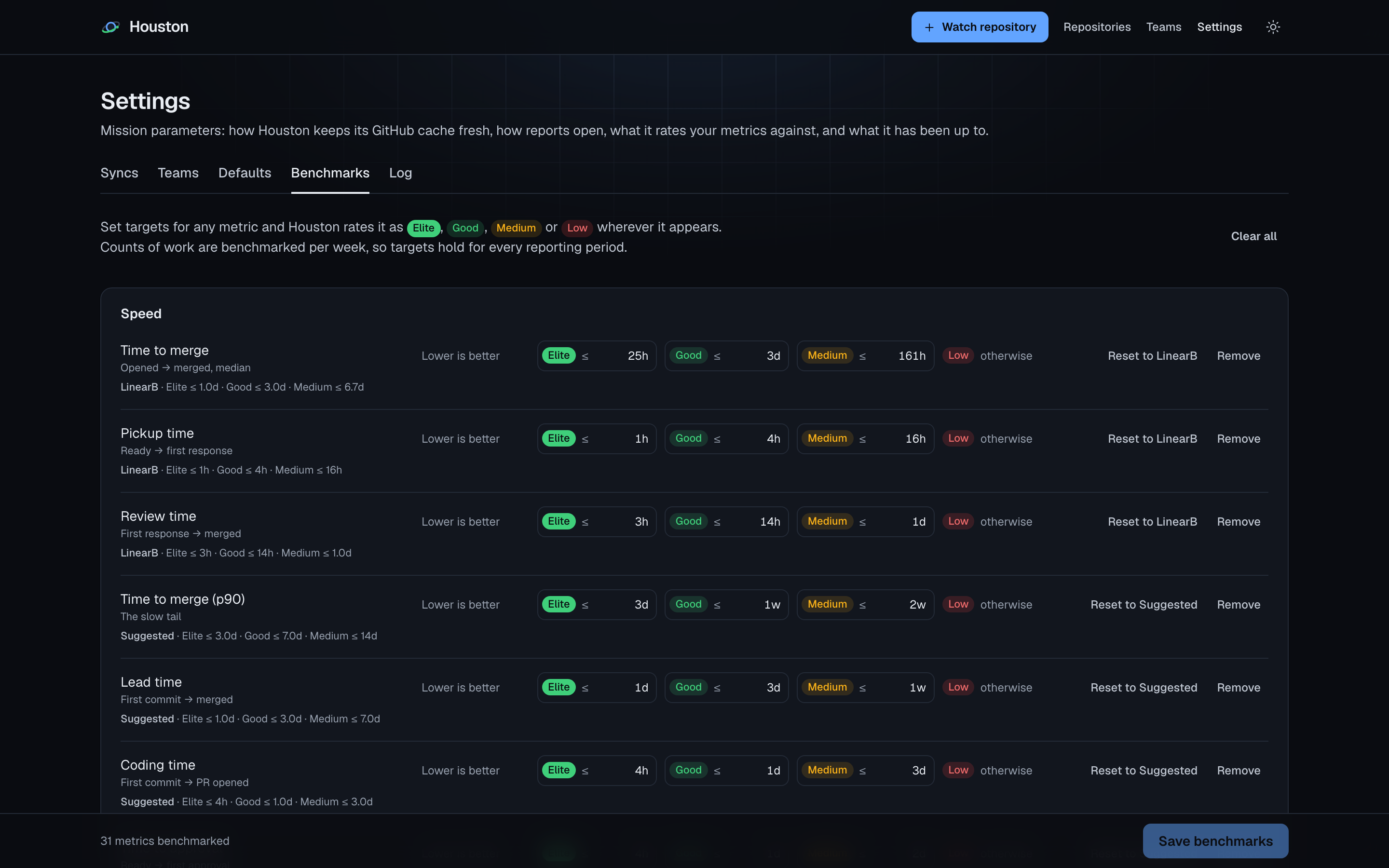
Set targets for any metric and Houston rates it as elite, good, medium or low wherever it appears. Counts of work are benchmarked per week, so one target holds for every reporting period.

  • Elite
  • Good
  • Medium
  • Low

It is opt-in: nothing is rated until you set targets. When you want a starting point, 31 standards are one click away: 4 from DORA, 4 from LinearB and 23 suggested targets.

Houston benchmark settings: elite, good and medium thresholds per metric, with LinearB and suggested standards
The 4 DORA standards
Metric Elite Good Medium Low
Deploy frequency1/day1/week1/month< 1/month
Lead time to production1 d7 d30 d> 30 d
Change failure rate5%10%15%> 15%
Time to restore1 h1 d7 d> 7 d

Thresholds a value must meet for each tier; anything worse than medium rates low.

Flight rules

How it measures, in plain words.

A metric is only useful if the team believes it. These are the flight rules, and most of them are settings.

Working time only

Durations that measure people (pickup, review, time to merge, recovery) count working time, so a PR opened on Friday evening doesn't look two days slower than one opened on Monday. Working days and hours are settings, and they count in the timezone you pick for your reports; the default is Monday to Friday, UTC. CI durations stay wall-clock.

A PR opened late Friday and reviewed Monday morning: only the blue part counts. The weekend doesn't.

Bots excluded

Pull requests from Dependabot, Renovate and other bots are left out of the metrics, so they don't skew people numbers. The bot backlog is reported on its own.

Every KPI against the previous period

Each number sits next to the same metric over the equally long period before it. "Last 30 days" is today and the 29 days before it, from midnight in your timezone, so every bar on a chart is a whole day and the bars add up to the number. Metrics that sum up one value per PR show the median and the average, so a skewed spread shows.

Nobody ranked

There are no author or reviewer tables. Houston reports on teams and repositories, never on individual people.

Change failure rate, inferred

A deployment counts as failed when the next one ships a revert, hotfix or rollback PR, matched on title, branch or labels. The pattern is configurable. There is no incident data behind it.

What counts as a deploy

GitHub Deployments to an environment named like prod, production or live. Repos without them fall back to published GitHub Releases.

Launch sequence

T-minus three steps to your first report.

  1. 1

    Clone and set up

    git clone https://github.com/vistik/Houston.git
    cd Houston
    composer setup

    composer setup installs the PHP and Node dependencies, creates .env, generates the app key, runs the migrations and builds the frontend.

  2. 2

    Connect GitHub

    gh auth login

    With GITHUB_TOKEN empty, Houston uses the GitHub CLI's token. On a server, set GITHUB_TOKEN in .env instead.

  3. 3

    Liftoff

    composer dev

    Starts the scheduler, five queue workers, a log tail and Vite. It doesn't start a web server: serve the app with Laravel Herd, or run php artisan serve next to it. Then click Watch repository and enter owner/name.

Requirements

  • PHP8.3+
  • Composer2
  • Node + npm22
  • DatabaseSQLite by default

Keeping it running

Syncs run on the queue, and the scheduler refreshes every watched repo every 15 minutes. On a long-running server, run a queue worker and the scheduler.

Authorized personnel only

Houston asks for a login out of the box; php artisan houston:install creates it. Turn it off on your laptop or a private network if you like; keep it on for a public server.

Full install guide →

FAQ

Pre-flight questions

Still have a question? Ask in GitHub Discussions [enable Discussions]

Is it really free?

Yes. Houston is MIT licensed. There is no paid tier, no hosted version and no seat count. No launch fees either.

Where does my data live?

On your server. Houston keeps a local cache of pull requests, reviews, workflow runs and deployments in SQLite by default, or in any database Laravel supports. Nothing is sent anywhere but GitHub's API.

Who can see the dashboards?

Authorized personnel only: whoever has the login. Houston has one login, on by default: php artisan houston:install creates it, and you can turn it off on your own machine. There are no per-user accounts. The /mcp endpoint has its own token.

Does it rank developers?

No. Houston reports on teams and repositories, never on individual people.

Does it work with GitLab or Bitbucket?

No. Houston reads GitHub only: pull requests, reviews, Actions workflow runs, and Deployments or Releases.

How is change failure rate measured?

A deployment counts as a failed change when the next deployment ships a revert, hotfix or rollback pull request, matched on its title, branch or labels. The pattern is configurable. It is inferred from pull requests, not from incident data.

Will it hit GitHub's rate limits?

It syncs every 15 minutes and pauses when fewer than 50 requests are left in the current window, leaving room for anything else that shares the token. Paused syncs resume when the window resets.

You are go for launch.

Point it at your repos and see your own numbers. Free and MIT licensed. One GitHub token, one SQLite file, nothing to sign up for.